

Tasks, organized as you capture

Write the task.
Skip the sorting.

Chorsu is a local-first task manager for Mac that works out the project and reminder from what you type. If the project is unclear, choose it right there. No inbox to sort later.

Free for 3 active projects. No subscription.

Apple silicon · macOS 26+ · English parsing

One thoughtone ready task
Quick Capture containing: send the report tomorrow at 9 after budget approval
Chorsu confirmation showing the report filed under Work for tomorrow at 9 and blocked until Budget approval
  • Project auto-detectedWork
  • Reminder auto-scheduledTomorrow at 9:00
  • Dependency auto-linkedComes back when “Budget approval” is complete.

The problem

A task should not create three more jobs.

Most task apps interrupt the work, then leave the sorting and remembering to you. Chorsu resolves those details while the thought is still fresh.

  1. 01File it

    Choose the right project.

  2. 02Schedule it

    Turn plain English into a reminder.

  3. 03Remember it

    Bring blocked work back when it is ready.

Automatic project routing

Stop sorting tasks into projects.

Type the task, not the filing instructions. Chorsu uses the words you wrote and what it knows about your projects to place clear tasks automatically.

No project name required.

Learn the Quick Capture workflow →


Quick Capture containing: fix the kitchen faucet
Chorsu confirmation showing the task automatically filed under Home

Plain-English reminders

Write “tomorrow at 9.” Keep moving.

No date picker. No scheduling detour. Chorsu reads the time from your sentence and shows exactly what it understood before you go.

The wording stays yours.

Read the reminder guide →
Quick Capture containing: book a dentist appointment tomorrow at 9
Chorsu confirmation showing the dentist appointment filed under Personal for tomorrow at 9

No cleanup Inbox

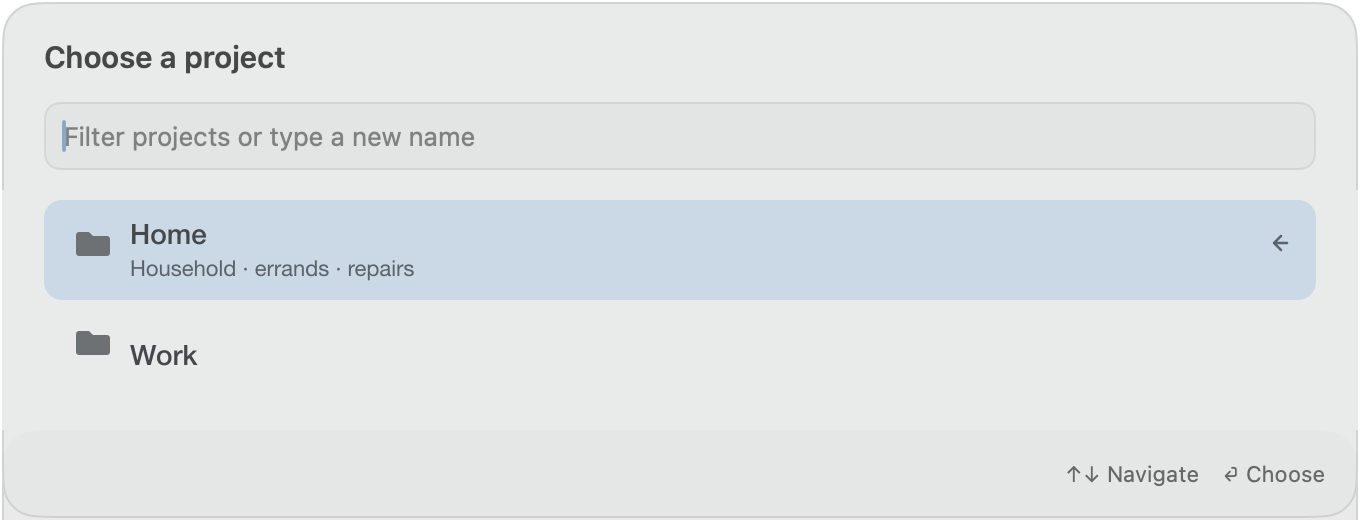
Unsure? Chorsu asks now—not later.

Ambiguous work never disappears into a pile for Future You. Pick the project in the same capture panel, and the task leaves already organized.

One decision. Zero cleanup queue.

Quick Capture containing: order a new keyboard
Chorsu project chooser with Home and Work options, Home selected
Chorsu confirmation showing the keyboard task filed under Home

Automatic comeback

Stop checking work you cannot do yet.

A blocked task stays out of Today. Complete its prerequisite and Chorsu brings the task back the moment it becomes actionable.

Ready work, not wishful work.

Learn how task dependencies work →

Just unblocked

Chorsu Today row showing Send the report under Just unblocked

Why the name Chorsu

One place in. The right path out.

Chorsu means “four paths” in Persian: a crossroads, where routes meet.

That is the app’s job. Every task enters through one Quick Capture. Chorsu routes it to the right project and carries its time and dependencies with it, instead of leaving another Inbox to sort later.

One capture point. No sorting Inbox.

Chorsu app icon

Your work stays yours

Your task text stays on your Mac by default.

No Chorsu account. No ads. Your tasks, projects, reminders, and dependencies are stored locally on your Mac.

On-device work
Your tasks, projects, and routing context remain local.
Honest diagnostics
Optional scrubbed crash and app-hang reports exclude every user-authored string and can be switched off.
No cloud dependency
Chorsu still captures and organizes tasks when optional local model assistance is unavailable.

Apple and RevenueCat handle purchases and Pro verification. RevenueCat also records when the upgrade screen is shown and when the free project limit is reached. Crash diagnostics are on by default and can be turned off. These reports exclude task text and project names. Optional integrations can share your content when you enable and connect them.

Simple by design

Start free. Pay once when you need more room.

The complete capture loop is free. Chorsu Pro changes one thing: how many active projects you can keep.

Chorsu Free

$03 active projects

The full task loop for a focused workspace.

  • 3 active projects
  • Unlimited tasks
  • Automatic project routing
  • Plain-English reminders
  • Dependencies and automatic comeback
  • No Chorsu account

Chorsu Pro

$19.99one time

More projects without another subscription.

  • Everything in Chorsu Free
  • Unlimited active projects
  • Lifetime Pro unlock
  • No recurring charge

Upgrade inside Chorsu whenever you need more projects.

Try Chorsu free ↗

U.S. App Store price. Regional pricing may vary. Requires Apple siliconand macOS 26 or later. Natural-language parsing is English-only.

The practical details

Questions before the first task.

What is Chorsu?

Chorsu is a Mac task app that organizes tasks as you capture them. It files clear tasks into projects, reads English reminders, and brings blocked work back when it becomes actionable.

What happens when Chorsu is not sure?

Chorsu asks you to choose the project inside Quick Capture. The task is created after that choice, so there is no Inbox to clean later.

Does Chorsu need Apple Intelligence?

No. Automatic project routing and English date parsing work without Apple Intelligence. Clear tasks file automatically; uncertain tasks ask you to choose a project inside Quick Capture. Optional on-device model assistance can improve project suggestions, but saving never waits for it.

What leaves my Mac?

Chorsu keeps your task text and project names on your Mac by default. The Mac App Store edition uses network access for purchase verification, two limited upgrade signals, and crash diagnostics you can turn off. If you enable local AI task access, clients you choose can read task data under their own terms.

What is included for free?

Chorsu Free includes 3 active projects, unlimited tasks, routing, reminders, dependencies, and the automatic comeback when blocked work becomes ready.

Where can I download Chorsu?

Chorsu is available on the Mac App Store. Download it free for 3 active projects and unlimited tasks. Requires macOS 26 or later on Apple silicon; natural-language parsing is English-only.

Download on the Mac App Store

Available on the Mac App Store

Capture the thought. Keep the focus.

Chorsu handles the filing, the time, and the work that is not ready yet.

Download on the Mac App Store